How to Do Keyword Research for SEOWithout the Manual Work
Our automated keyword research tool crawls your website, pulls real data, and surfaces the high opportunity SEO keywords for your content.
3-day free trial
31
Keywords per month
Smart
Opportunity scoring
Auto
Relevant for your website
Keyword research shouldn't take half a day.
Manually figuring out how to do SEO keyword research across multiple tools is slow, expensive, and still leaves gaps.
The manual approach to keyword research
- ✗Hours in Ahrefs, Semrush, and Google Search Console switching tabs
- ✗Expensive tool subscriptions just to find keywords to write about
- ✗No clear way to prioritize which keywords to target first
With Fast SEO Fix automated keyword research
- ✓Keyword suggestions pulled automatically from your website
- ✓Real search volume and difficulty data included
- ✓Smart scoring ranks keywords by opportunity so you start with the best ones
How to do keyword research for SEO with Fast SEO Fix
Automated, data-driven, ready to publish in minutes
We analyze your website
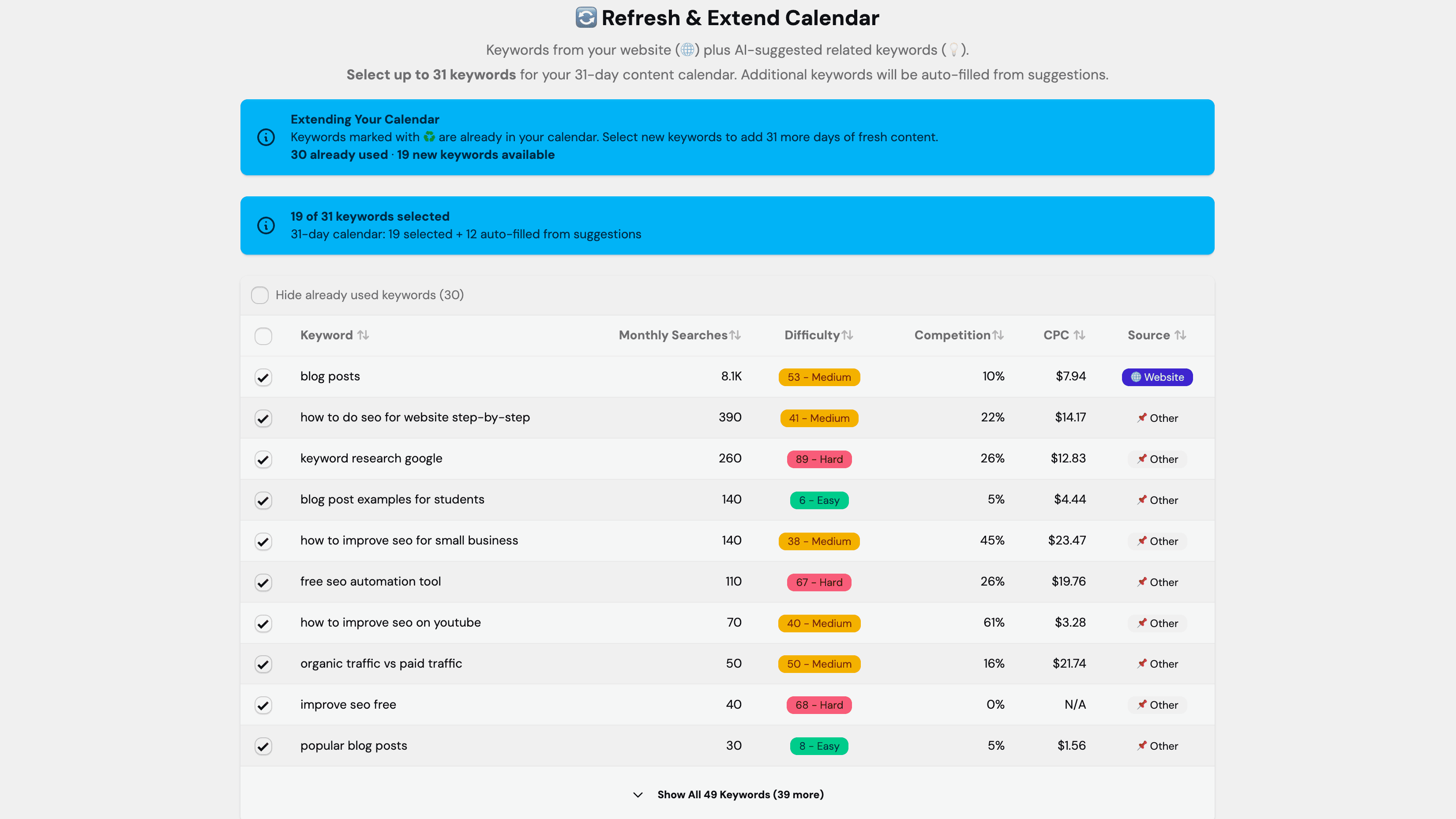
Enter your URL and our tool crawls your existing pages to understand your niche, extract seed topics, and identify content gaps worth targeting.
Real keyword data is pulled
We fetch accurate search volumes, keyword difficulty scores, CPC values, and competitor rankings for every suggested keyword.
Pick the most relevant SEO Keywords
You can choose whichever keywords you want to rank for. You have full control.
What makes our keyword research tool different
Not just a list of keywords. A ranked, actionable shortlist ready to feed into your content calendar.
Real data, not estimates
Every keyword comes with verified monthly search volume, difficulty (0–100), and CPC. No inflated estimates or outdated figures.
Smart opportunity scoring
Our Smart Score weighs search volume against difficulty to surface keywords where you can realistically rank. Stop wasting content budget on unwinnable keywords.
Competitor keywords included
Keyword suggestions include terms your competitors already rank for, surfacing proven opportunities that are working in your niche right now.
For anyone who wants to stop guessing what to write
Knowing how to do SEO keyword research is the foundation of any content strategy that earns organic traffic
Site Owners
Get a prioritized list of keywords to write about without needing an SEO agency or expensive tool subscriptions.
SEO Managers
Run keyword research for multiple sites quickly and feed the results directly into an automated content calendar.
Content Agencies
Deliver data-backed keyword strategies to clients in minutes, not days, using real data rather than manual research.
Two Ways to Find Your Perfect Keywords
Choose the approach that fits your workflow and expertise level
Automated Research
RecommendedPerfect for beginners and timesavers. Our AI-powered system analyzes your website, generates 50+ keyword suggestions, fetches competitor keywords, and provides complete SEO metrics. All automatically.
- ✓Automatic website content analysis
- ✓50+ AI generated keyword suggestions
- ✓Competitor keyword extraction
- ✓Complete metrics included
Best for: Content creators, bloggers, small businesses, and anyone who wants keyword research done automatically without manual analysis.
Bring Your Own Keywords
ProIdeal for SEO professionals and agencies who already have keyword research from tools like Ahrefs, SEMrush, or Google Keyword Planner. Upload your pre-researched keywords and Fast SEO Fix handles the content creation.
- ✓Manual keyword input
- ✓Use your existing research tools
- ✓Full control over keyword selection
- ✓Skip automated research step
Best for: SEO professionals, agencies, and advanced users who have established keyword research workflows and want to integrate their own data.
Can't decide? Start with Automated Research and switch to manual input anytime. Both approaches work seamlessly together — you can mix automated suggestions with your own keywords in the same content calendar.
Understanding Keyword Metrics
Learn what each metric means and how to use them to find the best keywords for your content
Monthly Searches
(Search Volume)
The estimated number of times this keyword is searched per month on Google. Higher numbers mean more potential traffic to your content.
Example:
“SEO tips” might have 10,000 monthly searches💡 Why it matters: Keywords with higher search volume can drive more visitors to your site, but may also be more competitive.
Difficulty
(Keyword Difficulty Score)
A score from 0–100 indicating how hard it is to rank for this keyword in Google's search results.
Ranges:
- 0–30: Easy — Good for new websites
- 30–60: Medium — Achievable with quality content
- 60–100: Hard — Requires strong domain authority
💡 Why it matters: Lower difficulty keywords are easier to rank for, especially when you're just starting out.
Competition
(Ad Competition Level)
A score from 0–1 showing how many advertisers are bidding on this keyword in Google Ads.
Ranges:
- 0–0.3: Low competition
- 0.3–0.7: Medium competition
- 0.7–1.0: High competition
💡 Why it matters: High competition often indicates the keyword has commercial value — people are willing to pay to advertise for it.
CPC
(Cost Per Click)
The average amount advertisers pay when someone clicks their ad for this keyword, measured in dollars (e.g., $2.50).
Example:
Higher CPC = more valuable keyword (commercially). Keywords with high CPC often indicate strong buyer intent.💡 Why it matters: High CPC keywords often indicate people searching these terms are more likely to convert or make a purchase, making them valuable for revenue-focused content.
What Is SEO Keyword Research?
SEO keyword research is the process of discovering and analyzing the exact search terms people use in search engines like Google. Understanding how to do keyword research for SEO is essential because it reveals what your target audience is actively searching for, allowing you to create content that matches their intent and ranks higher in search results.
Professional automated keyword research goes beyond simple guesswork. It involves analyzing critical metrics like monthly search volume (how many people search for a term), keyword difficulty (how hard it is to rank on a 0–100 scale), competition level (percentage of advertisers bidding on the keyword), and CPC (cost-per-click, indicating commercial value). These data points help you identify “quick win” keywords with high traffic potential and low competition.
Modern keyword research tools use professional APIs to access real Google Ads data, providing the same accurate metrics that enterprise SEO agencies rely on. Instead of manually researching hundreds of keywords, automated keyword research systems analyze your website, generate 50+ related suggestions, fetch competitor keywords, and provide complete SEO metrics — all in minutes rather than hours.
The goal isn't just finding keywords with high search volume. Effective SEO keyword research identifies terms where you can realistically rank (medium difficulty), that have genuine search demand (sufficient volume), and align with your content goals. By targeting the right keywords, you can dramatically increase organic traffic, improve your search rankings, and grow your online presence strategically.
Why Is Keyword Research Important for SEO?
Keyword research is the foundation of every successful SEO strategy. Without it, you're creating content based on assumptions rather than data — and most of that content will never rank. Here's why getting it right matters:
Search engines rank pages that best match what people are actually searching for. If you don't know the exact phrases your audience types into Google, you can't write content that satisfies those queries. Keyword research closes that gap — it shows you the precise language your potential visitors use, so every piece of content you publish is aligned with real demand.
Keyword research also helps you allocate content effort efficiently. Targeting a keyword with high difficulty and low volume wastes months of effort. Targeting one with low difficulty and healthy volume can bring consistent organic visitors within weeks. The opportunity scoring in Fast SEO Fix surfaces these high-value targets automatically.
Keyword Research for Organic SEO
Keyword research for organic SEO is specifically about finding terms you can rank for without paying for ads. Unlike paid search, where you can buy any keyword regardless of your site's authority, organic rankings are earned — and that means choosing keywords where your domain can realistically compete.
For organic SEO, the most important metric is keyword difficulty relative to your domain strength. New and mid-authority sites should prioritize keywords with a difficulty score below 40 — these are terms where a well-written, properly structured blog post can reach page one within a few months. Fast SEO Fix automatically filters and scores keywords for organic ranking potential, so you always start with the most achievable opportunities first.
Find Your Best Keywords Today
Let our tool do the SEO keyword research for you and turn the results into a full content calendar automatically.
